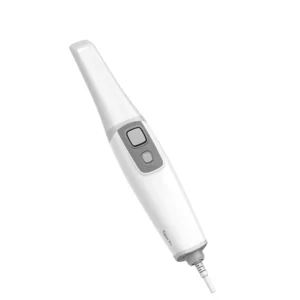
Digital impression scanning for clinics and labs. The AGKEM PRO V5 is an open-system intraoral scanner with a 160 g handpiece, standard and mini tips, and STL, PLY (true colour) and OBJ export.
An intraoral scanner is a handheld device that optically captures the teeth and oral structures and turns them into a 3D digital model, often called a digital impression. Instead of a tray and impression material, the clinician scans the required surfaces and reviews the model on a connected computer.
The scan file can then be stored, sent to a dental lab or used in compatible CAD/CAM workflows. It's a data-capture tool: it doesn't replace clinical examination or treatment planning, but it can replace the physical impression step in suitable cases.
Scanners differ in ergonomics, scanning workflow, output formats, connectivity and software, so the right choice depends on how your clinic and lab work.
The AGKEM PRO V5 is described as lightweight, with real-time 3D visualisation, multi-angle scanning and an open-system workflow that AGKEM states is compatible with most design software.
| Specification | Published value |
|---|---|
| Handpiece weight | 160 g (without cable) |
| Handpiece size | 243 × 40 × 32 mm |
| Accuracy | < 10 μm single crown; < 20 μm full arch |
| Output formats | STL, PLY (true colour), OBJ |
| Connectivity | Wired USB 3.0 |
| Capture method | Optical continuous video capture, 20 FPS |
| Depth of view | Up to 25 mm |
| Standard tip | 115 × 21 × 16 mm; scan area 16 × 14 mm |
| Mini tip | 115 × 17 × 13 mm; scan area 12 × 10 mm |
| Other | Real-colour technology, quick reset, multi-angle positioning |
Accuracy figures are manufacturer-published and depend on scanning technique, case and workflow. Confirm compatibility with your lab or design software before buying. The PRO V5 is priced on enquiry; see the product page for details.
Whether it pays off depends on scan volume, procedures, lab relationships, software, training and overall cost.
| Factor | Intraoral scanner | Traditional impression |
|---|---|---|
| Process | Optical scan creates digital data | Tray and impression material |
| Output | Electronic 3D model | Physical impression; must be digitised for digital work |
| Storage | Electronic | Physical |
| To the lab | File transfer to compatible systems | Collection or courier |
| Materials | Less dependence on impression materials | Requires trays and materials |
Scanning also lets the clinician see the model build on screen and rescan gaps during the appointment. Conventional impressions remain the right choice where digital scanning isn't suitable or available.
An open-system scanner exports scans in standard formats so they can be used with compatible third-party labs, design software and CAD/CAM systems. Common formats:
Don't rely on the word "open" alone. Check the exact formats, whether colour is retained, and whether your lab's software accepts them.
Prices vary with scanner technology, published accuracy, software, file formats, open or closed ecosystem, tips and accessories, warranty and support. Compare the full ownership cost, not just the first quotation. AGKEM quotes the PRO V5 on enquiry.
Patient → Intraoral scan → Digital impression → File export → CAD/CAM or dental lab → Restoration or appliance
The clinician captures the required areas, reviews the model and exports the file. The lab designs the case, or it goes into an in-house CAD/CAM setup. The PRO V5's STL, PLY and OBJ output supports this kind of open workflow, but always confirm compatibility with the specific software involved.
Creating digital impressions and 3D dental models for restorative, orthodontic, prosthodontic, implant and lab workflows. It can reduce reliance on physical impressions where scanning is suitable and makes electronic file transfer possible.
Accuracy varies by device, software, technique, scanning conditions and case. Manufacturers publish specifications; AGKEM lists under 10 μm for a single crown and under 20 μm for a full arch on the PRO V5. Treat these as published figures, not a guarantee for every case.
Not in every case. Scanning offers electronic data, real-time review, easier transfer and fewer impression materials, while conventional impressions remain relevant where scanning isn't suitable.
It depends on the scanner, operator experience, scan area and case complexity. The PRO V5 captures at 20 FPS; AGKEM doesn't state a single scan time for all procedures.
Yes, as part of compatible implant-restorative and orthodontic digital workflows, including clear aligners. Confirm the software and provider requirements before choosing a scanner.
All three transfer 3D models. STL carries geometry; PLY and OBJ can also carry information such as colour, depending on the software. The best format is the one your lab or CAD/CAM system accepts. The PRO V5 exports all three.
It can be, if your digital work justifies it. Look at patient volume, procedures, lab relationships, computer setup, software, training and budget.
Prices depend on the scanner, software, accuracy, formats, accessories, ecosystem, support and brand. The AGKEM PRO V5 is priced on enquiry, so contact AGKEM for current pricing.
An intraoral scanner captures data directly inside the patient's mouth. A dental lab scanner digitises physical models, impressions and other lab objects.
Considering the PRO V5? Tell AGKEM about your procedures and the lab or software you work with. Call +91 88261 92637 or email info@agkem.com.