Dental scanners are an important part of modern digital dentistry. They convert physical dental information into digital data that can be used for diagnosis, treatment planning, CAD design and manufacturing.
Depending on the application, a dental scanner may capture information directly from a patient’s mouth or digitise a physical model, impression or other laboratory object. Intraoral scanners and laboratory scanners therefore serve different purposes, even though both are part of a digital dental workflow.
AGKEM offers dental scanning solutions for both clinical and laboratory applications, including the AGKEM PRO V5 intraoral scanner and laboratory scanning systems from brands such as Shining 3D. These scanners can be used as part of broader CAD/CAM workflows involving digital design, milling and 3D printing.
A dental scanner is a device that captures three-dimensional information about teeth, oral structures, dental models or other objects and converts that information into digital data.
The resulting digital model can be used for applications such as:
The type of scanner required depends on what needs to be scanned.
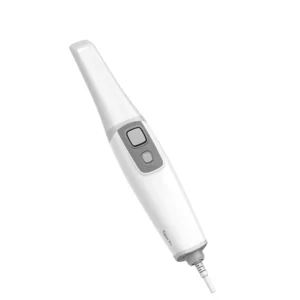
An intraoral scanner is a digital scanning device designed to capture the patient’s teeth and oral structures directly inside the mouth.
Instead of taking a conventional physical impression, the dentist moves the scanner’s tip around the relevant areas. The scanner captures multiple images or data points and software combines them into a three-dimensional digital model.
This digital file can then become part of a broader digital dentistry workflow.
AGKEM’s PRO V5 is an open-system intraoral scanner designed for digital scanning applications. Its published specifications include scanning modes for different clinical situations and support for exporting digital scan data into compatible workflows. (agkem.com)
A laboratory scanner is generally used to digitise physical objects outside the patient’s mouth.
Depending on the scanner and software, these objects may include:
Laboratory scanners are particularly relevant for dental laboratories that receive physical impressions or models but want to perform design and manufacturing digitally.
AGKEM’s CAD/CAM portfolio includes laboratory scanning systems such as the Shining 3D AutoScan-DS-EX Pro (H). (agkem.com)
Although both create digital dental data, the scanning environment and intended use are different.
Feature | Intraoral Scanner | Laboratory Scanner |
Scanning location | Inside the patient’s mouth | Dental laboratory |
Primary use | Digital impressions and clinical scanning | Digitising models and impressions |
Physical impression required | Generally not required for the scan | Can scan physical impressions or models |
Typical users | Dentists and clinical teams | Dental laboratories and technicians |
Digital workflow | Clinical to CAD/CAM | Laboratory CAD/CAM |
Some practices and laboratories may use both technologies because they address different stages of the digital workflow.
The scanning process generally involves capturing multiple images or measurements as the scanner moves across the teeth and surrounding areas.
The scanner software processes this information and builds a digital three-dimensional representation.
A simplified workflow is:
Prepare the Field → Scan → Build the Digital Model → Review the Data → Export → CAD Design
Scanning technique can affect the final result. Factors such as moisture control, visibility, scan path, preparation margins, patient movement and the condition of the scanning field can influence data acquisition.
For this reason, the scanner itself is only one part of successful digital scanning.
Dental scanners can support a wide range of clinical and laboratory applications.
Intraoral scanners can be used to create digital impressions for suitable restorative and prosthodontic workflows.
Digital scan data can be transferred into CAD software to support the design of crowns and bridges.
Scanners can contribute to digital implant workflows by capturing relevant intraoral structures and, where supported, integrating compatible implant-related scan data.
Digital models can be used for orthodontic records, treatment planning and the design or manufacture of selected appliances.
Digital scanning can form part of workflows for designing dentures and related components, depending on the system and software being used.
Digital scan data can become the starting point for a CAD/CAM workflow in which restorations or other components are digitally designed and subsequently milled or printed.
One of the main reasons practices adopt intraoral scanning is to capture digital impressions without relying on conventional impression materials for the scanning stage.
This can simplify certain workflows and allow the digital model to move directly into compatible software.
Digital files can be transferred electronically to a dental laboratory or another compatible system instead of physically sending an impression.
Digital scans can be stored electronically and retrieved when required, subject to the practice’s data-management and patient-record procedures.
A digital three-dimensional model can be displayed on a screen, allowing the dental team to explain relevant findings or treatment considerations to the patient.
One of the major advantages of digital scanning is its ability to connect with other digital technologies. Scan data can be used as an input for CAD design and subsequent manufacturing where the systems are compatible.
Buying a scanner based only on advertised accuracy or speed can lead to an incomplete comparison. The scanner should be evaluated as part of the workflow in which it will be used.
Accuracy is an important specification, particularly for restorative and implant-related applications.
However, the final quality of a digital impression also depends on scanning technique, preparation, moisture control, software processing and the area being scanned.
Scanning speed can influence appointment duration and laboratory productivity.
Rather than comparing a single advertised scanning-speed figure, consider how quickly the scanner performs during the types of cases your practice or laboratory actually handles.
For an intraoral scanner, the scanner’s weight, dimensions and tip design can affect handling during longer scanning sessions.
Patient comfort should also be considered because the scanner needs to be positioned inside the mouth during image acquisition.
The software experience is an important part of the scanner.
Look at features such as scan review, data editing, case management, export options and compatibility with the other software used in your digital workflow.
Check which file formats the scanner can export and whether those formats are accepted by the CAD software, laboratory or manufacturing system you intend to use.
An open workflow can be particularly useful when a clinic works with multiple laboratories or manufacturing platforms.
Consider how the scanner connects to the computer and what hardware and operating-system requirements are involved.
The scanner should fit comfortably into the practice’s existing digital infrastructure.
An open dental scanner is designed to provide greater flexibility when transferring digital scan data into compatible third-party software or manufacturing workflows.
Open systems can be useful when a dental clinic or laboratory does not want its scanning workflow tied exclusively to one manufacturer’s ecosystem.
However, “open” does not mean that every scanner, software package and manufacturing system will automatically work together. Supported file formats, software compatibility and workflow requirements should still be checked.
AGKEM’s PRO V5 is positioned as an open-system intraoral scanner. (agkem.com)
A closed system generally keeps scanning, software and downstream manufacturing within a more controlled ecosystem.
This can simplify compatibility because the components are designed to work together, but it may provide less flexibility when integrating equipment from different manufacturers.
The choice between an open and closed workflow depends on the clinic’s existing technology, preferred laboratory partners and manufacturing requirements.
Scanner accuracy is often discussed as though it is a single number, but real-world performance involves several factors.
The scanner’s hardware and software are important, but so are:
A scanner that performs well in one clinical situation may not produce identical results in every type of case.
When comparing systems, consider the applications that matter most to your practice rather than relying only on a manufacturer’s headline specification.
A scanner becomes particularly useful when it is connected to a broader CAD/CAM workflow.
A typical digital workflow can include:
Intraoral Scanning → Digital Model → CAD Design → CAM Processing → Milling or 3D Printing → Finishing
For example, scan data from an intraoral scanner can be sent to compatible CAD software. The restoration can then be designed digitally and manufactured using a suitable milling machine or 3D printer.
AGKEM’s CAD/CAM portfolio includes scanners alongside milling machines, sintering furnaces and dental 3D printers, allowing different components of the digital workflow to be evaluated together. (agkem.com)
A clinic choosing an intraoral scanner should first identify where scanning will fit into its daily workflow.
Consider:
For a practice starting digital scanning for the first time, ease of use and workflow compatibility may be just as important as individual hardware specifications.
A dental laboratory may have different scanning requirements.
If the laboratory primarily receives physical models and impressions, a laboratory scanner may be more relevant than an intraoral scanner.
The laboratory should consider:
AGKEM’s range includes laboratory scanners designed for digital laboratory workflows, including the Shining 3D AutoScan-DS-EX Pro (H). (agkem.com)
Dental scanner prices in India vary considerably depending on whether you are purchasing an intraoral scanner or laboratory scanner.
Price can be affected by factors such as:
An intraoral scanner should not be compared directly with a laboratory scanner simply because both are marketed as dental scanners. They perform different roles within the digital workflow.
When comparing prices, consider the total cost of ownership and the software or hardware required to use the scanner effectively.
AGKEM’s dental scanning portfolio covers both clinical and laboratory requirements.
The AGKEM PRO V5 provides an intraoral scanning option for clinical workflows, while the CAD/CAM portfolio includes laboratory scanners such as the Shining 3D AutoScan-DS-EX Pro (H). (agkem.com)
These scanners can also be considered alongside AGKEM’s wider CAD/CAM range, which includes dental milling machines, sintering furnaces and 3D printers.
This makes it possible to evaluate scanning equipment based on the broader digital workflow rather than treating the scanner as an isolated purchase.
A dental scanner is a device that captures three-dimensional information about teeth, oral structures, dental models or other objects and converts it into digital data for compatible clinical or laboratory workflows.
An intraoral scanner is used inside the patient's mouth to capture digital information about teeth and oral structures. The resulting data can be used to create a digital impression and support compatible CAD/CAM workflows.
A dental laboratory scanner digitises physical dental objects such as models, impressions, dies or articulators so they can be used in digital design and manufacturing workflows.
"Intraoral scanner" describes a specific type of dental scanner designed for scanning inside the mouth. "Dental scanner" is a broader term that can also include laboratory scanners.
An intraoral scanner can be used for digital impressions and a range of restorative, prosthodontic, orthodontic and implant-related digital workflows, depending on the scanner and software.
Potential benefits include digital impression capture, electronic data transfer, easier digital storage, patient communication and integration with compatible CAD/CAM workflows.
They are different methods of capturing dental information. An intraoral scanner can provide a digital workflow without the scanning stage of a conventional physical impression, but suitability depends on the clinical case, operator and workflow.
Accuracy varies between scanners and clinical situations. It can also be affected by scanning technique, moisture control, scan length, preparation visibility, patient movement and software processing.
An open intraoral scanner is designed to provide flexibility when exporting digital scan data to compatible third-party software and workflows. Compatibility still needs to be verified for the specific systems involved.
Dental scanners may support formats such as STL, PLY or OBJ, depending on the manufacturer and software. The supported formats should be checked before purchasing if you plan to work with external laboratories or CAD/CAM systems.
The price varies according to the scanner's hardware, software, accuracy, scanning capabilities, workflow, support and included accessories. Compare the total package rather than hardware price alone.
Laboratory scanner prices vary according to scanning technology, accuracy, automation, software, applications and included accessories. The required workflow should be defined before comparing models.
Yes, intraoral scanners can form part of compatible implant workflows. The exact applications depend on the scanner, software, implant components and digital workflow being used.
Yes. Digital scans can be used for orthodontic records, treatment planning and compatible appliance workflows, depending on the system and software.
Yes. Digital scan data can be transferred into compatible CAD/CAM software and subsequently used for manufacturing through a suitable milling machine or 3D printer.
Check accuracy, scanning speed, ergonomics, software, supported file formats, open or closed workflow, computer requirements, compatibility, warranty, training and after-sales support.
A dental clinic should choose a scanner based on its clinical applications, expected scan volume, laboratory workflow, software compatibility, ease of use and budget.
A laboratory receiving physical models or impressions may require a dedicated laboratory scanner. The appropriate choice depends on the types of cases, scan volume, CAD software and manufacturing workflow.
Yes. AGKEM offers intraoral scanning equipment including the AGKEM PRO V5 and also lists laboratory scanning systems within its CAD/CAM portfolio.
Start by identifying whether you need intraoral or laboratory scanning, then compare accuracy, workflow compatibility, software, file formats, scanning speed, ergonomics, support and total cost of ownership.
CBCT is often part of a wider dental imaging equipment ecosystem. Depending on clinical requirements, dental professionals may also evaluate complementary technologies available through AGKEM.
AGKEM’s current Dental Clinic equipment navigation includes CBCT, Dental Chair, Dental X-ray / RVG and Intraoral Scanner categories, allowing practices to evaluate imaging and other clinical equipment as part of a broader setup.
For a clinic evaluating a dental CBCT machine, the most important question is not simply which system has the highest specification.
The better approach is to match the machine’s imaging capabilities, workflow, physical requirements and support arrangements to the clinical questions your practice actually needs to answer.
For current specifications and a quotation for the Fussen Dentrix 50, review the official AGKEM product page and contact AGKEM with your requirements.